


Below the space for site name and details is a section in which are a number of variables, many of which can be used in What-if analysis (very many other factors can also be varied). It is convenient to describe them in the order in which they appear on screen.
To get here from any other part of FIAP use the tabs at the bottom of the screen, or use the Go To option available under either the Edit or the View menus.
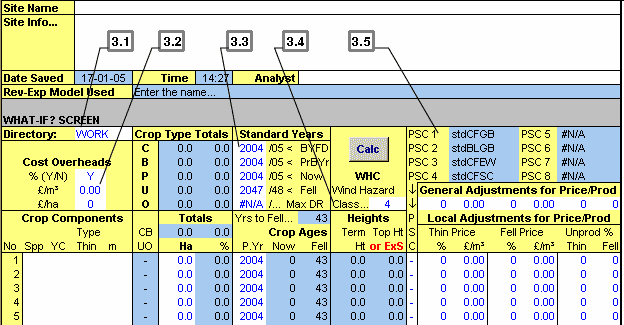
It is possible to choose the sub-directory in which analysed models of F are saved on disk. This default is WORK, which is within the directory PCFIAP, but you may find it convenient to have more than one, thus classifying your work in some way. To do this, make another directory within PCFIAP (not within WORK) using Windows’ File Manager, and enter the name of this sub-directory here when you want to save your work within it. The first time you save work after changing the name of this sub-directory, use the Save As command from the File menu.
There are three types of cost overhead, placed here for convenience during What-if analysis. The three ways in which overheads can be added to costs are by:
• A percentage of each cost (added in the Revenue-Expenditure model)
• A charge per cubic metre of timber produced
• A flat annual rate per hectare
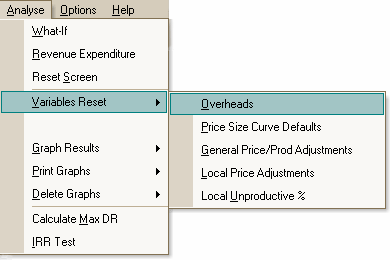
For the second and third of these, a value is entered, but the percentage increase of costs is only an on/off switch - operated by entering Y or N in the appropriate cell. In the Revenue-Expenditure model the actual percentage level of overheads must be set for each cost individually (see section 6). Overheads are not applied to land cost in this version of FIAP. After altering the level of overheads, you can reset overheads to their default levels manually, or with the Variables Reset command in the Analyse menu. The defaults are: Y(es) for percentage overheads, and zeros for the other two.
FIAP uses four particular years as standards from which timings are set - for allocating costs and receipts to the cash flow, adjusting costs and prices for inflation, and discounting to a specified base year. The years shown are fiscal years, ending in March. You only have to enter the first part of any year, the latter part is automatically updated when the FIAP is next calculated. The Dates Now and Fell command in the crops menu prompts you for two of these years - the year now and the year of felling - allowing you to change either of the years if you wish. But you can also enter the figures directly without invoking this command.
If you change the Year Now this automatically changes the other three years unless you’ve already typed in a different year for one or more of the others.
This affects the inflation factor applied to prices and costs. The default is Year Now (see below) but you may change this to any year. To re-establish the linkage, type in =Yearnow (one word). Yearnow is a name given to the cell where Year Now is entered; you must precede the word with an equals sign (=) or it is interpreted as text.
This is the year to which discounting is carried out. Normally that is Year Now, i.e., the current year (see below) which is set as the default, but you may change this to any year. To re-establish the linkage, type in =Yearnow (one word), as explained in the previous paragraph.
This is the year from which you want to view the economic performance of the crop components comprising the coupe. It can be set to any year up to the felling year (see below). The difference between year now and the year of felling is shown in the Yrs to Fell box. The default Year Now is the current (fiscal) year ending in March, but you need not hesitate to overwrite this, and to alter it as much as you like during analysis, but it will thereafter remain at whatever year you enter. Results are adjusted to the year you enter whenever you recalculate FIAP.
This is the year in which the coupe is felled - a coupe can only have one felling year. The default entry is YearNow+50 but you may overwrite this during analysis. Year Fell must be more than Year Now (see above), and the maximum permitted time period from Year Now to Year Fell is 160 years. You may either type in =YearNow+n (where n is any figure from 1 to 160) to link Year Now with Year Fell, or you may keep them independent by entering a date. The difference between Year Now and Year Fell is shown in the Yrs to Fell box (recalculate if necessary).
This is not one of the standard years; it is for record only. Nothing in FIAP is based on it, unless you decide to enter it as Year Fell. When FIAP is first loaded this year is shown as not available (#NA) because it has not been calculated. During analysis, when the year in which DR (discounted revenue) reaches a maximum is calculated. you are offered the options of recording it here, and of making it the Year Fell, if you wish. (See section 8).
It is important to recognise that even when it is recorded here, it is not automatically updated when costs or prices or other factors are changed: it must be recalculated by the Calculate Max DR command in the Analyse menu.
FIAP requires a wind hazard class for the coupe. The default is 4, but you may overwrite this with any figure between 1 and 6. Only one wind hazard class may be entered for the whole coupe, but with variable terrain you can enter different classes successively, for different parts of the coupe, and note which components would be at risk.
FIAP shows the terminal height (in metres) of each crop component in the first of the height columns, based on its age at felling and the specified wind hazard class. Recalculate if necessary.
In the second of the two height columns, FIAP shows one of two figures. If the top height at the age of felling would be less than the terminal height, the top height is shown in black figures (in metres). However, if the top height would be more than the terminal height, FIAP changes the figure to show by how much the crop’s top height will exceed the terminal height, giving an indication of how serious the problem is likely to be. The figure is shown as a warning red negative (how far it is on the “wrong” side, in metres). Recalculate if necessary.
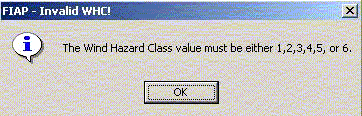
If no wind hazard class is entered, or a figure below 1 or above 6, an error message is displayed.
The part of the screen to the right of the wind hazard class shows which price-size curves (PSC) are available for use during analysis. Below that is a row of six figures labelled “General Adjustments for Price/Prod”. You can read more about selecting a PSC during analysis and about adjusting price and productivity levels during What-if analysis in Section 4 and creating or amending price-size curves (or schedules) is dealt with in section 6.
